Vehicle Acceleration Monitor 1.0




21
0
21
0
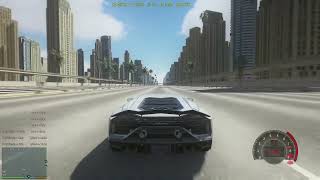
This is a script that can test the acceleration performance of each vehicle, which is very useful for players who specialize in studying the performance of game vehicles or players who are keen on modifying the Handling.meta data of vehicles
Extract the downloaded file and place the VehiclePerformeTracker.dll and VehiclePerformeTracker.ini files into the scripts folder of the game's main directory
The configuration file Vehicle Performance Tracker. ini allows you to modify the acceleration score, mile acceleration time, top speed HUD X, Y, Z positions, and text size. After making the necessary changes, press F5 in the game (the default button can be customized and modified in Vehicle Performance Tracker. ini) to refresh the position
After entering the vehicle, start the engine to display various scores
The acceleration score needs to reach the specified speed to be displayed, otherwise it will be hidden without a limit (0-100, 0-200... 0-1000...)
Mileage acceleration time needs to reach the specified level to be displayed, otherwise hide the maximum monitoring of 5 miles (1/4mile, 1/2mile, 1mile, 2mile, 3mile, 4mile, 5mile)
The maximum speed will remain displayed unless you turn off the engine or get off the car
Required plugins
ScriptHookV
dinput8.dll
ScriptHookVDotNet-v3.7.0-nightly.78
.NET
Tip: Currently, the script has only been successfully tested in the LEGACY version. It is unknown whether the ENHANCED version supports it. If you have tried and it works, please let me know in the comment section. Thank you
Extract the downloaded file and place the VehiclePerformeTracker.dll and VehiclePerformeTracker.ini files into the scripts folder of the game's main directory
The configuration file Vehicle Performance Tracker. ini allows you to modify the acceleration score, mile acceleration time, top speed HUD X, Y, Z positions, and text size. After making the necessary changes, press F5 in the game (the default button can be customized and modified in Vehicle Performance Tracker. ini) to refresh the position
After entering the vehicle, start the engine to display various scores
The acceleration score needs to reach the specified speed to be displayed, otherwise it will be hidden without a limit (0-100, 0-200... 0-1000...)
Mileage acceleration time needs to reach the specified level to be displayed, otherwise hide the maximum monitoring of 5 miles (1/4mile, 1/2mile, 1mile, 2mile, 3mile, 4mile, 5mile)
The maximum speed will remain displayed unless you turn off the engine or get off the car
Required plugins
ScriptHookV
dinput8.dll
ScriptHookVDotNet-v3.7.0-nightly.78
.NET
Tip: Currently, the script has only been successfully tested in the LEGACY version. It is unknown whether the ENHANCED version supports it. If you have tried and it works, please let me know in the comment section. Thank you
Først uploadet: 6 hours ago
Sidst opdateret: 3 hours ago
Last Downloaded: 14 minutter siden
1 Kommentar
More mods by Lisztdreams:
This is a script that can test the acceleration performance of each vehicle, which is very useful for players who specialize in studying the performance of game vehicles or players who are keen on modifying the Handling.meta data of vehicles
Extract the downloaded file and place the VehiclePerformeTracker.dll and VehiclePerformeTracker.ini files into the scripts folder of the game's main directory
The configuration file Vehicle Performance Tracker. ini allows you to modify the acceleration score, mile acceleration time, top speed HUD X, Y, Z positions, and text size. After making the necessary changes, press F5 in the game (the default button can be customized and modified in Vehicle Performance Tracker. ini) to refresh the position
After entering the vehicle, start the engine to display various scores
The acceleration score needs to reach the specified speed to be displayed, otherwise it will be hidden without a limit (0-100, 0-200... 0-1000...)
Mileage acceleration time needs to reach the specified level to be displayed, otherwise hide the maximum monitoring of 5 miles (1/4mile, 1/2mile, 1mile, 2mile, 3mile, 4mile, 5mile)
The maximum speed will remain displayed unless you turn off the engine or get off the car
Required plugins
ScriptHookV
dinput8.dll
ScriptHookVDotNet-v3.7.0-nightly.78
.NET
Tip: Currently, the script has only been successfully tested in the LEGACY version. It is unknown whether the ENHANCED version supports it. If you have tried and it works, please let me know in the comment section. Thank you
Extract the downloaded file and place the VehiclePerformeTracker.dll and VehiclePerformeTracker.ini files into the scripts folder of the game's main directory
The configuration file Vehicle Performance Tracker. ini allows you to modify the acceleration score, mile acceleration time, top speed HUD X, Y, Z positions, and text size. After making the necessary changes, press F5 in the game (the default button can be customized and modified in Vehicle Performance Tracker. ini) to refresh the position
After entering the vehicle, start the engine to display various scores
The acceleration score needs to reach the specified speed to be displayed, otherwise it will be hidden without a limit (0-100, 0-200... 0-1000...)
Mileage acceleration time needs to reach the specified level to be displayed, otherwise hide the maximum monitoring of 5 miles (1/4mile, 1/2mile, 1mile, 2mile, 3mile, 4mile, 5mile)
The maximum speed will remain displayed unless you turn off the engine or get off the car
Required plugins
ScriptHookV
dinput8.dll
ScriptHookVDotNet-v3.7.0-nightly.78
.NET
Tip: Currently, the script has only been successfully tested in the LEGACY version. It is unknown whether the ENHANCED version supports it. If you have tried and it works, please let me know in the comment section. Thank you
Først uploadet: 6 hours ago
Sidst opdateret: 3 hours ago
Last Downloaded: 14 minutter siden
 5mods on Discord

The currently known vulnerability is an error in the display of vehicle brake data. I will adjust it in future updates