manual transmission for controller 1.0

![Stunt Race Map [Map Editor / Menyoo]](https://img.gta5-mods.com/q75-w500-h333-cfill/images/stunt-race-map-editor/3c12e9-3.jpg "Stunt Race Map [Map Editor / Menyoo]")

12
1
12
1
This mod is designed for Xbox controller users.
TRANSMISSION CONTROLS
LB - Shift Up
A - Shift Down
A (from 1st Gear) - Shift to Neutral
A (from Neutral) - Shift to Reverse
Double-Tap A - Instantly shift to the recommended gear
HUD EDITING CONTROLS
L - Toggle HUD Edit Mode
N - Save HUD Layout
H - Select Gear Text
J - Select Speedometer
K - Select RPM Gauge
G - Select Gear Advisor Bar
If you want to turn of any display edit the ini file and put false where true is
MOVING HUD ELEMENTS
Use the Arrow Keys to move the currently selected HUD element.
Left Arrow - Move Left
Right Arrow - Move Right
Up Arrow - Move Up
Down Arrow - Move Down
FEATURES
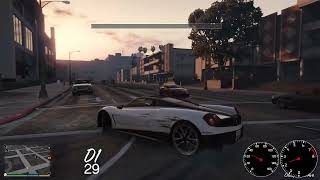
Manual transmission system for Xbox controllers
Reverse, Neutral, and Drive gears
Recommended gear assistance
Double-tap downshift to instantly select the optimal gear
RPM and Speedometer gauges
Gear Advisor Bar
Fully customizable HUD positioning
Automatic saving of HUD layouts
Every vehicle starts in 1st Gear (D1) when entered
REQUIREMENTS
Please download the following for the mod to work:
ScriptHookV
ScriptHookVDotNet Enhanced
INSTALLATION
Install ScriptHookV to your main GTA V directory.
Install ScriptHookVDotNet Enhanced to your main GTA V directory.
Place the ManualGear folder and ManualTransmission.dll into your GTA V scripts folder.
SPECIAL THANKS
Alexander Blade
Creator of ScriptHookV
Chiheb-Bacha Developer of ScriptHookVDotNet Enhanced (SHVDN3)
(Enables .NET scripting for GTA V)
TRANSMISSION CONTROLS
LB - Shift Up
A - Shift Down
A (from 1st Gear) - Shift to Neutral
A (from Neutral) - Shift to Reverse
Double-Tap A - Instantly shift to the recommended gear
HUD EDITING CONTROLS
L - Toggle HUD Edit Mode
N - Save HUD Layout
H - Select Gear Text
J - Select Speedometer
K - Select RPM Gauge
G - Select Gear Advisor Bar
If you want to turn of any display edit the ini file and put false where true is
MOVING HUD ELEMENTS
Use the Arrow Keys to move the currently selected HUD element.
Left Arrow - Move Left
Right Arrow - Move Right
Up Arrow - Move Up
Down Arrow - Move Down
FEATURES
Manual transmission system for Xbox controllers
Reverse, Neutral, and Drive gears
Recommended gear assistance
Double-tap downshift to instantly select the optimal gear
RPM and Speedometer gauges
Gear Advisor Bar
Fully customizable HUD positioning
Automatic saving of HUD layouts
Every vehicle starts in 1st Gear (D1) when entered
REQUIREMENTS
Please download the following for the mod to work:
ScriptHookV
ScriptHookVDotNet Enhanced
INSTALLATION
Install ScriptHookV to your main GTA V directory.
Install ScriptHookVDotNet Enhanced to your main GTA V directory.
Place the ManualGear folder and ManualTransmission.dll into your GTA V scripts folder.
SPECIAL THANKS
Alexander Blade
Creator of ScriptHookV
Chiheb-Bacha Developer of ScriptHookVDotNet Enhanced (SHVDN3)
(Enables .NET scripting for GTA V)
Først uploadet: 16 hours ago
Sidst opdateret: 4 hours ago
Last Downloaded: 4 minutter siden
1 Kommentar
More mods by tom_mods:
This mod is designed for Xbox controller users.
TRANSMISSION CONTROLS
LB - Shift Up
A - Shift Down
A (from 1st Gear) - Shift to Neutral
A (from Neutral) - Shift to Reverse
Double-Tap A - Instantly shift to the recommended gear
HUD EDITING CONTROLS
L - Toggle HUD Edit Mode
N - Save HUD Layout
H - Select Gear Text
J - Select Speedometer
K - Select RPM Gauge
G - Select Gear Advisor Bar
If you want to turn of any display edit the ini file and put false where true is
MOVING HUD ELEMENTS
Use the Arrow Keys to move the currently selected HUD element.
Left Arrow - Move Left
Right Arrow - Move Right
Up Arrow - Move Up
Down Arrow - Move Down
FEATURES
Manual transmission system for Xbox controllers
Reverse, Neutral, and Drive gears
Recommended gear assistance
Double-tap downshift to instantly select the optimal gear
RPM and Speedometer gauges
Gear Advisor Bar
Fully customizable HUD positioning
Automatic saving of HUD layouts
Every vehicle starts in 1st Gear (D1) when entered
REQUIREMENTS
Please download the following for the mod to work:
ScriptHookV
ScriptHookVDotNet Enhanced
INSTALLATION
Install ScriptHookV to your main GTA V directory.
Install ScriptHookVDotNet Enhanced to your main GTA V directory.
Place the ManualGear folder and ManualTransmission.dll into your GTA V scripts folder.
SPECIAL THANKS
Alexander Blade
Creator of ScriptHookV
Chiheb-Bacha Developer of ScriptHookVDotNet Enhanced (SHVDN3)
(Enables .NET scripting for GTA V)
TRANSMISSION CONTROLS
LB - Shift Up
A - Shift Down
A (from 1st Gear) - Shift to Neutral
A (from Neutral) - Shift to Reverse
Double-Tap A - Instantly shift to the recommended gear
HUD EDITING CONTROLS
L - Toggle HUD Edit Mode
N - Save HUD Layout
H - Select Gear Text
J - Select Speedometer
K - Select RPM Gauge
G - Select Gear Advisor Bar
If you want to turn of any display edit the ini file and put false where true is
MOVING HUD ELEMENTS
Use the Arrow Keys to move the currently selected HUD element.
Left Arrow - Move Left
Right Arrow - Move Right
Up Arrow - Move Up
Down Arrow - Move Down
FEATURES
Manual transmission system for Xbox controllers
Reverse, Neutral, and Drive gears
Recommended gear assistance
Double-tap downshift to instantly select the optimal gear
RPM and Speedometer gauges
Gear Advisor Bar
Fully customizable HUD positioning
Automatic saving of HUD layouts
Every vehicle starts in 1st Gear (D1) when entered
REQUIREMENTS
Please download the following for the mod to work:
ScriptHookV
ScriptHookVDotNet Enhanced
INSTALLATION
Install ScriptHookV to your main GTA V directory.
Install ScriptHookVDotNet Enhanced to your main GTA V directory.
Place the ManualGear folder and ManualTransmission.dll into your GTA V scripts folder.
SPECIAL THANKS
Alexander Blade
Creator of ScriptHookV
Chiheb-Bacha Developer of ScriptHookVDotNet Enhanced (SHVDN3)
(Enables .NET scripting for GTA V)
Først uploadet: 16 hours ago
Sidst opdateret: 4 hours ago
Last Downloaded: 4 minutter siden
 5mods on Discord

This file has been approved automatically. If you think this file should not be here for any reason please report it.